Understanding CBRC (Content Based Read Cache)
vSphere 5 CBRC feature has been to certain extent discussed on the Internet and few bloggers have found and published some information about it. William Lam has published New Hidden CBRC (Content-Based Read Cache) Feature in vSphere 5 & for VMware View 5?, and also commented on the New vSphere VMware ESXi 5.0.0 GA VSISH Configurations. Few other posts describing CBRC have also surfaced, like this one here from Greg Carriger.
In many ways, storage remains one of the largest costs for supporting VDI deployments, perhaps after Microsoft licensing. Reducing and containing storage infrastructure costs while scaling out VDI deployments is a critical benefit towards massive VDI adoption.
Storage vendors over the last couple years have been changing their discourse and pricing methodology; from dollar per gigabyte to dollar per IOps. In my article Get hold of VDI IOPs, Read/Write Ratios and Storage Tiering I discussed the importance of understanding the virtual desktop IO pattern in VDI deployments. On the same article I briefly discussed the I/O split between Replicas and Linked Clones. I recommend reading the articles above mentioned for a better understanding of how and why IOs are so important, especially in VDI deployments.
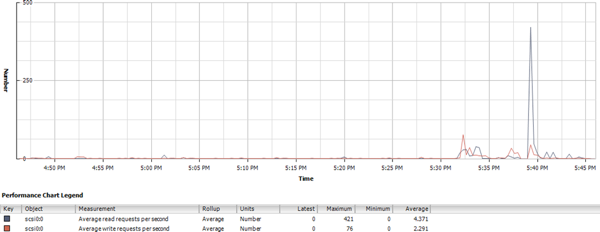
The graph below demonstrates Windows during boot time. You should observe a gigantic peak on read IOs during boot time.
The CBRC feature is already baked into vSphere 5 and VMware View administrators are expecting it to be integrated with VMware View in the future. CBRC will help address some of the performance bottlenecks and the increase storage cost for VDI. CBRC is a 100% host-based RAM-Based caching solution that help to reduce read IOs issued to the storage subsystem and thus improves scalability of the storage subsystem while being completely transparent to the guest OS.
The feature has been primarily designed to help with read-intensive I/O storms, such as OS boot and reboot, A/V scans, and administrators should expect to see significant reduction in peak read I/O being issued to the array for these workloads.
There are two components to the cache:
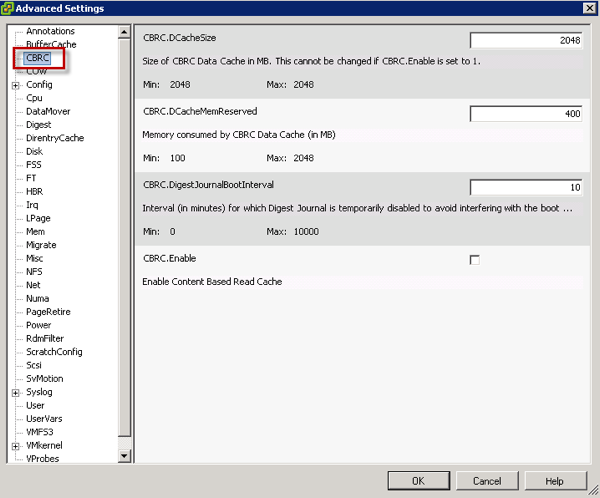
- The In-Memory Cache - This is configured by the administrator and has a fixed maximum size of 2GB and default of 400MB memory reservation. This is a dynamic cache - It loads blocks on demand and manages the cache based on access patterns of the various blocks on the vmdk.
- A digest/metadata table that is maintained on disk for each vmdk disk on the host. The metadata holds information about the various blocks on the vmdk. It can be imagined as a hash table with each hash entry pointing to a particular block.
Putting 1 and 2 together, if there is a read request to a particular block on the vmdk, a hash value is computed and the in-memory cache is checked to see if the block is present. If it is not present, the hash table is accessed and the appropriate block is loaded into the in-memory cache. If the block is already in-memory, it is returned back to the user.
The additional memory taken up by CBRC itself is treated as a 'regression' as far as memory consumption goes. Since memory requirements are not as high for CBRC for steady state workload vSphere characterize and reduce memory consumption.
CBRC will benefit VDI environments without intelligent arrays and cache management. However, for arrays with read or read/write cache management CBRC will also help to reduce IO latency in the storage fabric. Because read IOs are served from in-host RAM there is no requirement to go out to the network to retrieve data blocks. Additionally, data blocks are retrieved to to the guest in terms of microseconds, instead of milliseconds. This IO performance improvement will be clearly noticed by end-users while using their desktops on a day-to-day basis; but remember that write IOs are still the majority of the IOs during steady state workload. A common estimative is that write IOs represent anywhere between 50% to 80% of the total number of IOs. Go ahead and read my article How to offload Write IOs from VDI deployments for a better understanding on how to handle write IOs more eficiently.
CBRC can run 100% independent from VMware View, solely using technology available in vSphere 5 (this has been identified by William Lam here). This approach allows other VDI brokering solutions compatible with vSphere 5 to leverage the technology without modifications to the product or solution. Dan Brinkmann has put CBRC to the test with Citrix XenDesktop here.
A special thanks goes to Narasimha Krishnakumar for helping me with information for this post.
This article was first published by Andre Leibovici (@andreleibovici) atmyvirtualcloud.net.
13 comments
Tom
I had heard CBRC wasn't supported for VMware View. Is this true?
Andre Leibovici
@Tom
You are correct, VMware View 5.0 does not currently support CBRC. Unfortunately, I am not in a position to comment on VMware View product roadmap.
Andre
larstr
@Tom,
CBRC is not officially supported by VMware View. That does not mean it's not working.
Lars
Tom
CBRC is on by default though. So this means that unless people are turning it off, any View deployment on ESXi is unsupported, correct?
TDwiek
Hi Andre,
Do you know if CBRC can also be used with host based SSD such as a PCIe card or the like? Or is it just limited to server DRAM for now?
Thanks,
Tarik
Andre Leibovici
@TDwiek
CBRC is a 100% host-based DRAM-Based caching solution.
No SSD or Nand devices are supported for CBRC today.
Andre
Pranesh
Hello Andre,
How is CBRC different from TPS(Transparent Page sharing)
fula
@Andre Leibovici Is it far fetched to assume that all the pieces are in place to eventually support CBRC on SSDs (preferably PCIe for lower latency). I realize maintaining proper support for all the infrastructure features (vMotion, DRS,etc...) is probably the challenging aspect. However since so many companies are providing PCIe based caching solutions, it seems to me that eventually VMWARE will subsume such functionality... What do you think the likelihood of that happening is?
Andre Leibovici
@fula
I don't think the feature was designed with this purpose, however I don't know how much effort would be involved to modify the feature set. I would like to be able to answer to your question but I am not across the CBRC plans to support NAND devices.
Andre
Andre Leibovici
@Pranesh
TPS (Transparent Page Sharing) very simplistically, look for common memory blocks in RAM and collapse them to reduce the total used memory footprint. Other techniques are also used to reduce the amount of used memory such as ballooning and compress.
CBRC uses a reserved (up to 2GB) amount of host memory to store the most accessed storage data blocks. This allow for faster retrieve of the data block when a guest VM request that specific block. CBRC reduce storage fabric latency moving the most accesses data closer to the guests.
I hope that helps you.
Andre
Will
Anyone have more recent experience with XenDesktop 5.6 or 7 and CBRC? Have a possible case study or two coming up.
Andre Leibovici
Will, as far as I know CBRC is only supported by Horizon View.
-Andre
Will
You are correct. I know the only "supported" configuration is with View 5.1. I'm just wondering if anyone (besides Dan Brinkmann) has this working with XenDesktop.
Comments are preserved from the original site and are closed.